
Computer System
Systems are everywhere in daily life, an ATM, a fingerprint scanner, a QR code on a poster. This note explains what a system actually is, then walks through real systems you use regularly to show how they all follow the same input, processing, output pattern.
What is a System?
A system is a set of components that work together to achieve a common goal.
Components → Work Together → Achieve a Goal
Key Idea: A system is not one part alone. It is several parts working together for one purpose.
What is a Computer System?
A computer system accepts data, processes it, and produces useful information.
This connects to a second, equally important flow:
DATA → PROCESSING → INFORMATION
Key Idea: Data is given as input, processed by the computer, and useful information is produced as output. Every example below is the same three step pattern applied to a different problem.
Systems in Everyday Life
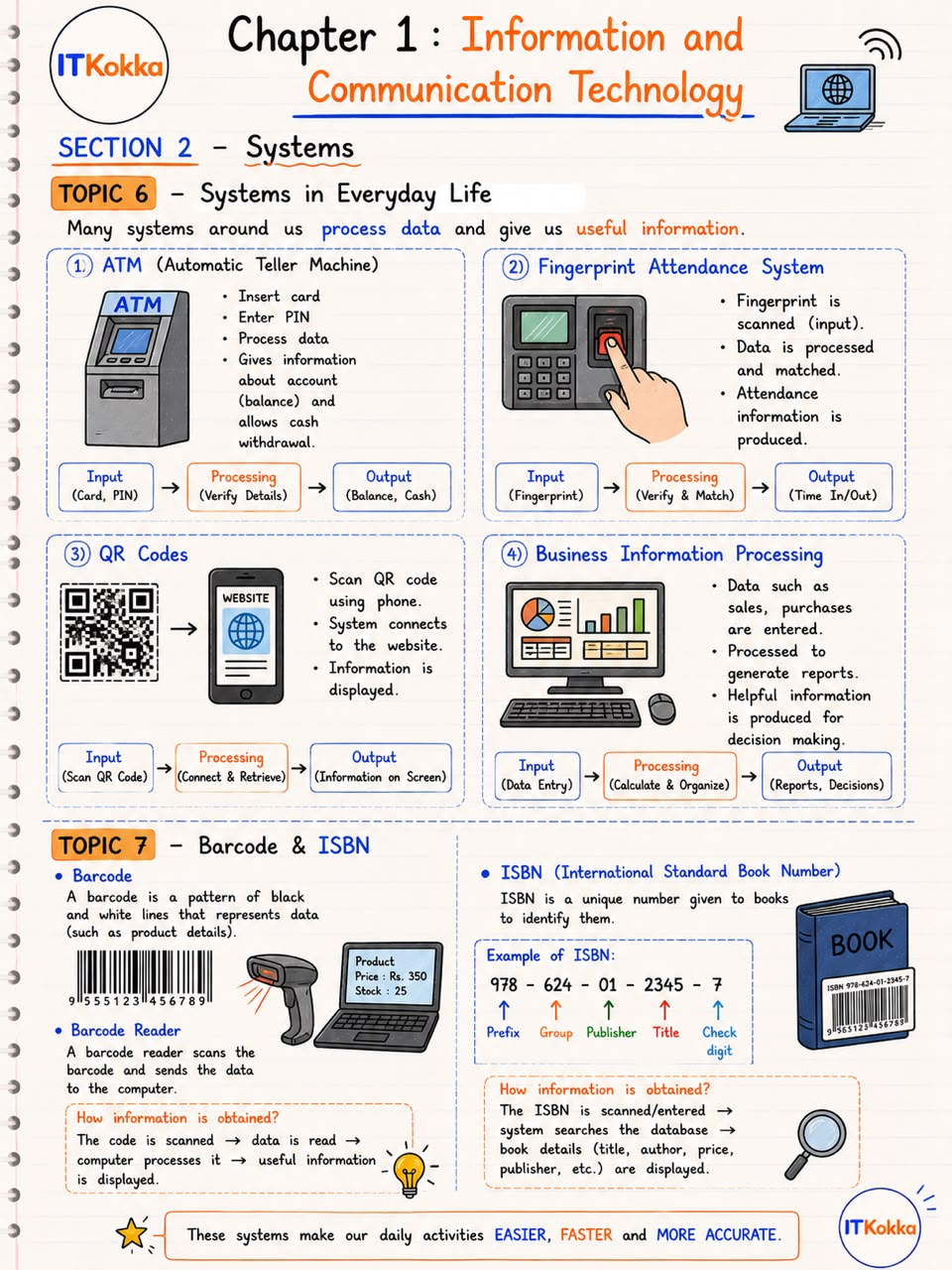
Real-World Example: ATM- Input: card, PIN
- Processing: verify the details, check the account
- Output: balance, cash
The ATM inserts your card and PIN as input, verifies them against your account, and gives you information back, whether the withdrawal succeeded, and how much cash to dispense.
Real-World Example: Fingerprint Attendance System- Input: fingerprint
- Processing: verify and match against stored fingerprints
- Output: time in, time out
A raw fingerprint scan is just data. Once the system matches it to an employee record, it becomes information, an actual attendance entry.
Real-World Example: QR Codes- Input: scan the QR code with a phone
- Processing: the system connects to the website it points to and retrieves the content
- Output: information displayed on the screen
The black and white pattern in a QR code is meaningless until a phone scans and decodes it. What appears on the screen afterward, a menu, a link, a payment page, is the information.
Real-World Example: Business Information Processing- Input: data entry, such as sales and purchases
- Processing: calculate and organize the figures
- Output: reports and decisions
A business enters raw sales figures every day. On their own, these are just numbers. Once calculated and organized into a report, they become information a manager can use to decide what to order next.
Key Idea: Four very different systems, an ATM, a fingerprint scanner, a QR code reader, a business database, all follow the same input, processing, output structure. Learn the pattern once, and you can explain any computer system with it.
Barcode and ISBN
Barcode
A barcode is a pattern of black and white lines that represents data, such as a product's price and stock details.
A barcode reader scans the barcode and sends the data to a computer for processing.
How is the information obtained?The reader turns the scan into information through a short chain of steps.
The code is scanned → data is read → the computer processes it → useful information (such as the product's price) is displayed.
ISBN
An ISBN (International Standard Book Number) is a unique number given to a book to identify it.
Example of an ISBN978 - 624 - 01 - 2345 - 7
Each group of digits has a purpose: Prefix, Group, Publisher, Title, and a Check digit at the end that verifies the number was entered correctly.
How is the information obtained?Scanning or typing in the ISBN triggers the same kind of lookup as a barcode.
The ISBN is scanned or entered → the system searches its database → the book's details (title, author, price, publisher) are displayed.
Both the barcode and the ISBN work the same way: a short code, meaningless data on its own, unlocks detailed information the moment a system looks it up.
Summary
- A system is a set of components working together to achieve one goal.
- A computer system turns input (data) into output (information) through processing.
- ATMs, fingerprint scanners, QR codes, and business systems all follow the same input, processing, output pattern, only the details of the processing change.
- A barcode or an ISBN is meaningless data until a system scans it and looks up its details.
Remember: Input → Processing → Output, and Data → Processing → Information.